Redacting Sensitive Information with NKP Diagnose

Hello friends, welcome back!
Today we're going to talk about how to redact sensitive information when collecting a support bundle with nkp diagnose.
nkp diagnose is the Nutanix Kubernetes Platform CLI command for collecting a support bundle from a cluster. Under the hood it uses troubleshoot.sh, the open-source toolkit that gathers cluster info, logs, and resources into a single compressed bundle. This bundle is incredibly useful for troubleshooting, but it can also contain sensitive data like internal FQDNs, hostnames, and LAN IP addresses. We'll walk through how to configure custom redactors so we can share bundles without leaking that information.
What nkp diagnose does and why redaction matters
When you run nkp diagnose, the CLI collects a bundle of cluster information to help diagnose issues. Because it uses troubleshoot.sh, the bundle is highly configurable through a YAML spec.
The default spec already collects a lot of useful data, but it does not know your environment's sensitive identifiers. Things like customer names embedded in hostnames or internal LAN IP ranges can end up in plain text inside the bundle. Before sharing the bundle with anyone, we want to mask those values.
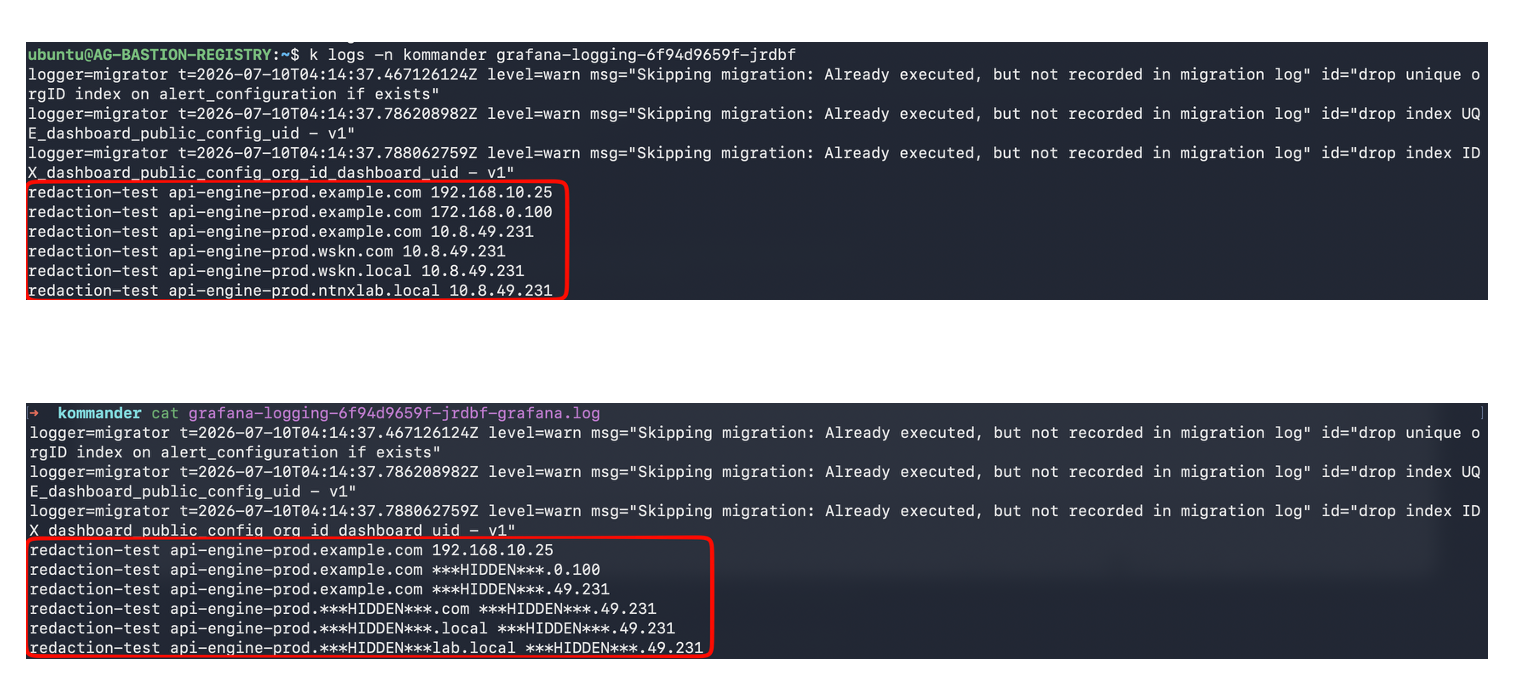
The redactor file
A troubleshoot.sh Redactor is a YAML document with apiVersion: troubleshoot.sh/v1beta2 and kind: Redactor. It contains a list of redactors, each with a name and a set of removals. Each removal uses a regular expression with a named capture group called mask. Only the text inside (?P<mask>...) is replaced with ***HIDDEN***.
I've prepared a starter redactor file called nkp-partial-redactors.yaml. Save it in the same directory where you'll run nkp diagnose.
apiVersion: troubleshoot.sh/v1beta2
kind: Redactor
metadata:
  name: nkp-partial-redactors

spec:
  redactors:

    ###########################################################################
    # RULE 1: REDACT SELECTED STRINGS INSIDE FQDNS
    #
    # Masks only the sensitive substring and preserves the rest of the FQDN.
    #
    # Example:
    #   api-sensitive-val1-prod.example.com
    #   becomes:
    #   api-***HIDDEN***-prod.example.com
    #
    # Add or remove values inside the named mask group:
    #   (?P<mask>sensitive-val1|sensitive-val2|customer-name)
    #
    # Matching is case-insensitive because the expression starts with (?i).
    ###########################################################################

    - name: redact-sensitive-substrings-inside-hostnames-and-fqdns
      removals:
        regex:
          - redactor: '(?i)(\b(?:[a-z0-9-]+\.)*[a-z0-9-]*)(?P<mask>ntnxlab|ntnx|wskn)([a-z0-9-]*(?:\.[a-z0-9-]+)*\b)'

    ###########################################################################
    # RULE 2: REDACT THE FIRST TWO OCTETS OF SELECTED LAN IP ADDRESSES
    #
    # Masks only explicitly listed LAN prefixes.
    #
    # Examples:
    #   192.168.20.45 -> ***HIDDEN***.20.45
    #   172.20.8.10   -> ***HIDDEN***.8.10
    #   10.50.100.25  -> ***HIDDEN***.100.25
    #
    # Replace the example prefixes with the LAN prefixes used by your nodes.
    #
    # Do not add pod or service network prefixes. This keeps pod IPs, pod CIDRs,
    # Service ClusterIPs, and service CIDRs visible.
    ###########################################################################
    - name: redact-first-two-octets-of-selected-lan-ips
      removals:
        regex:

          # LAN prefix: 172.168.x.x
          # Change "168" to the required second octet.
          - redactor: '(?P<mask>\b172\.168)(\.(?:25[0-5]|2[0-4][0-9]|1?[0-9]{1,2})\.(?:25[0-5]|2[0-4][0-9]|1?[0-9]{1,2})\b)'

          # LAN prefix: 10.8.x.x
          # Change "8" to the required second octet.
          - redactor: '(?P<mask>\b10\.8)(\.(?:25[0-5]|2[0-4][0-9]|1?[0-9]{1,2})\.(?:25[0-5]|2[0-4][0-9]|1?[0-9]{1,2})\b)'


###############################################################################
# USAGE
#
# - Only text inside (?P<mask>...) is hidden.
# - These rules apply to collected logs and other text files in the bundle.
# - Add sensitive FQDN strings to Rule 1.
# - Add only node LAN prefixes to Rule 2.
# - Do not add pod or service CIDR prefixes.
# - Test the extracted bundle before sharing it.
###############################################################################
How to edit the redactor file
The key thing to remember is that only the text inside (?P<mask>...) is hidden. The rest of the regex is preserved, which is why these are "partial" redactors.
Rule 1: FQDN substrings
Look at the first redactor:
- name: redact-sensitive-substrings-inside-fqdns
  removals:
    regex:
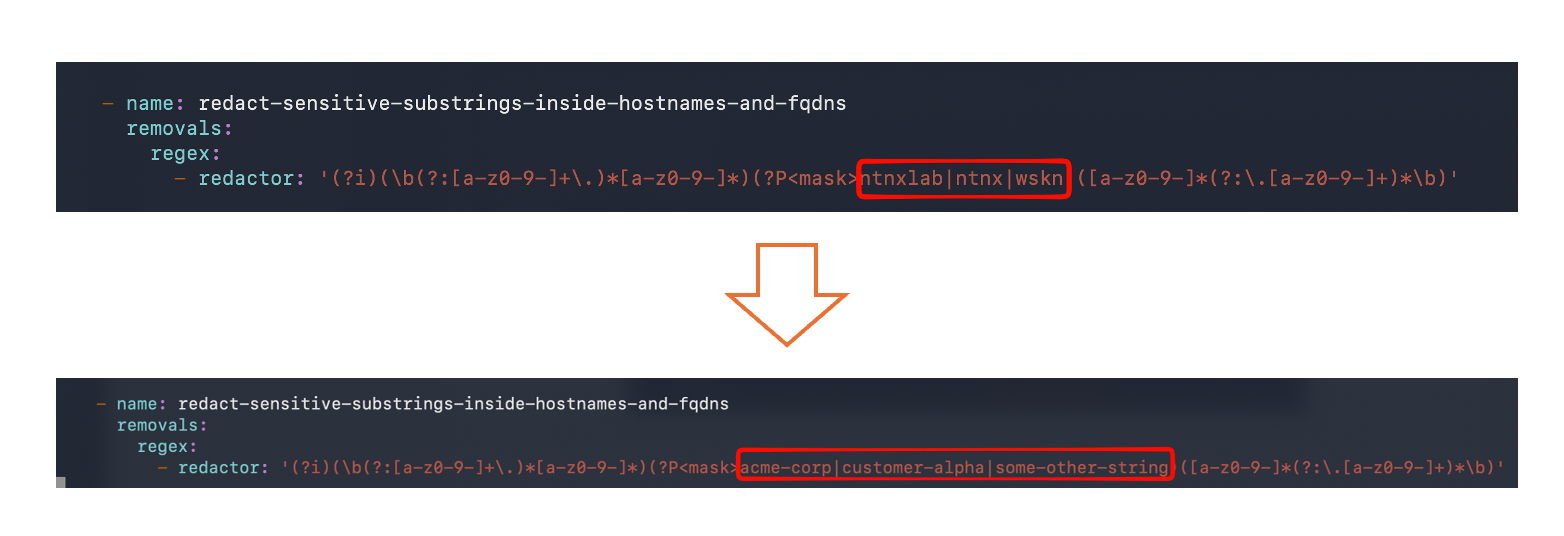
      - redactor: '(?i)(\b(?:[a-z0-9-]+\.)*[a-z0-9-]*)(?P<mask>ntnxlab|ntnx|wskn)([a-z0-9-]*(?:\.[a-z0-9-]+)*\b)'
The (?P<mask>wskn|ntnx|ntnxlab) part is the list of sensitive strings. Replace these with your own values. For example, if your hostnames contain acme-corp or customer-alpha, change it to:
- redactor: '(?i)(\b(?:[a-z0-9-]+\.)*[a-z0-9-]*)(?P<mask>acme-corp|customer-alpha|some-other-string)([a-z0-9-]*(?:\.[a-z0-9-]+)*\b)'
The (?i) at the beginning makes matching case-insensitive.
Rule 2: LAN IP prefixes
Look at the second redactor:
- name: redact-first-two-octets-of-selected-lan-ips
  removals:
    regex:
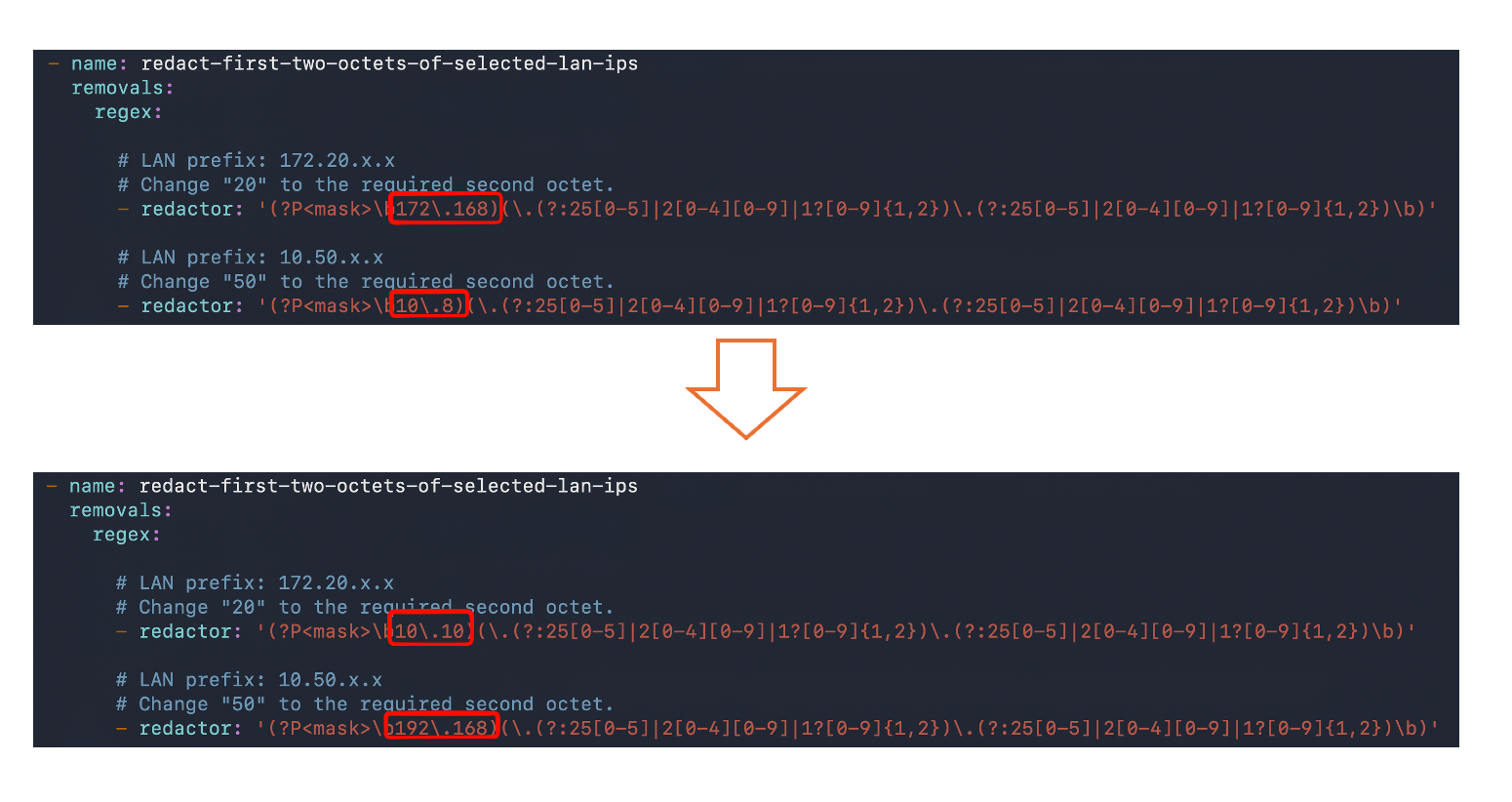
      - redactor: '(?P<mask>\b172\.168)(\.(?:25[0-5]|2[0-4][0-9]|1?[0-9]{1,2})\.(?:25[0-5]|2[0-4][0-9]|1?[0-9]{1,2})\b)'
      - redactor: '(?P<mask>\b10\.8)(\.(?:25[0-5]|2[0-4][0-9]|1?[0-9]{1,2})\.(?:25[0-5]|2[0-4][0-9]|1?[0-9]{1,2})\b)'
Change the (?P<mask>\b172\.168) and (?P<mask>\b10\.8) parts to match your node LAN prefixes. For example, if your nodes are on 10.10.x.x and 192.168.x.x, add:
- redactor: '(?P<mask>\b10\.10)(\.(?:25[0-5]|2[0-4][0-9]|1?[0-9]{1,2})\.(?:25[0-5]|2[0-4][0-9]|1?[0-9]{1,2})\b)'
- redactor: '(?P<mask>\b192\.168)(\.(?:25[0-5]|2[0-4][0-9]|1?[0-9]{1,2})\.(?:25[0-5]|2[0-4][0-9]|1?[0-9]{1,2})\b)'
Important: only add node LAN prefixes here. Do not add pod CIDR or service CIDR prefixes. Keeping pod IPs, pod CIDRs, Service ClusterIPs, and service CIDRs visible makes troubleshooting much easier.
Generating the diagnose config and merging the redactor
Once the redactor file is ready, we need to combine it with the default nkp diagnose configuration.
First, export the default diagnose spec:
nkp diagnose default-config > default-diagnose.yaml
Then append the redactor to the end of the file with a seperator:
echo "---" >> default-diagnose.yaml
cat nkp-partial-redactors.yaml >> default-diagnose.yaml
The order does not matter much, but appending at the end keeps the redactor rules easy to find.

Running the diagnose command against the target cluster
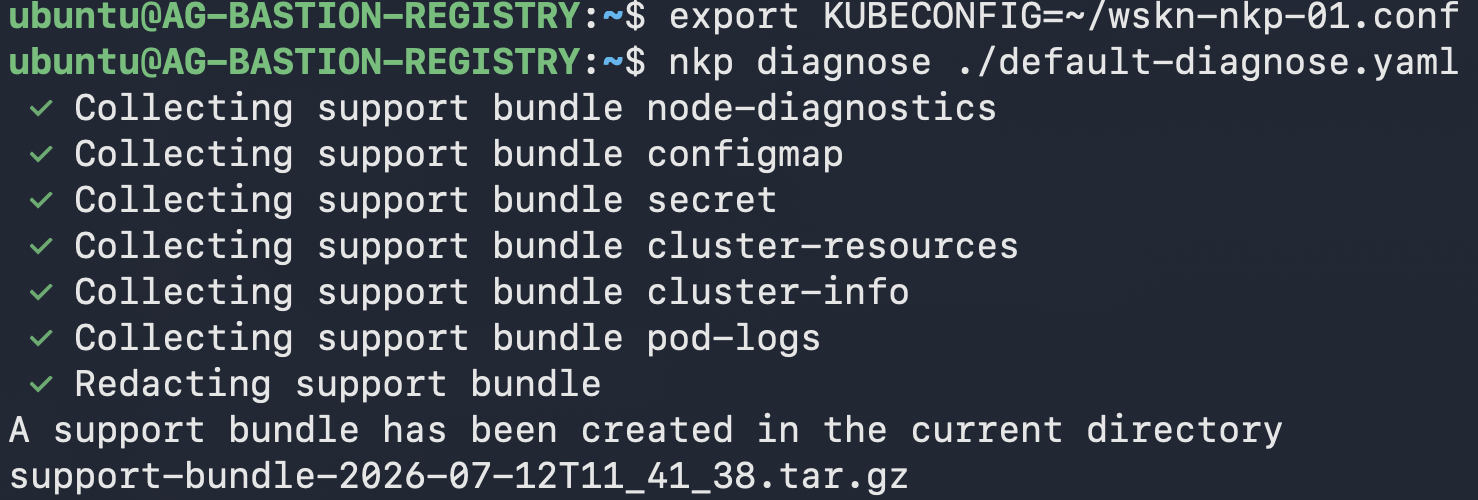
Make sure your KUBECONFIG environment variable points to the kubeconfig of the cluster you want to inspect. Then run:
export KUBECONFIG=/path/to/cluster-kubeconfig
nkp diagnose ./default-diagnose.yaml
The CLI will collect the bundle and apply the redactor rules as it processes the collected text files.
Using the bundle with troubleshoot-live
If you want to inspect the bundle locally with troubleshoot-live, the redacted values can cause problems because the tool expects valid IP addresses and hostnames. We can "unredact" the bundle into safe dummy values before serving it.
First, extract the bundle:
tar zxvf support-bundle-*.tar.gz
This will create a directory like support-bundle-YYYY-MM-DD-hh-mm-ss. Rename it to a simple path:
mv support-bundle-YYYY-MM-DD-hh-mm-ss ./support-bundle
Then run the following script to patch the ***HIDDEN*** markers into dummy values. The script skips binary files, patches partial IP redactions into the 198.18.x.x documentation range, and replaces any remaining ***HIDDEN*** markers with the word redacted.
BUNDLE_DIR="./support-bundle"

find "${BUNDLE_DIR}" -type f -print0 |
while IFS= read -r -d '' file; do
  # Skip binary files.
  grep -Iq . "${file}" || continue

  perl -pi -e '
    # Partially masked IPv4 address:
    # ***HIDDEN***.49.39 -> 198.18.49.39
    s{
      \*\*\*HIDDEN\*\*\*
      \.
      (25[0-5]|2[0-4][0-9]|1?[0-9]{1,2})
      \.
      (25[0-5]|2[0-4][0-9]|1?[0-9]{1,2})
    }{198.18.$1.$2}gx;

    # Remaining markers, including hostname/FQDN values:
    # api-***HIDDEN***-prod -> api-redacted-prod
    s{\*\*\*HIDDEN\*\*\*}{redacted}g;
  ' "${file}"
done
Now start the local troubleshoot-live server against the patched directory:
troubleshoot-live serve "${BUNDLE_DIR}"
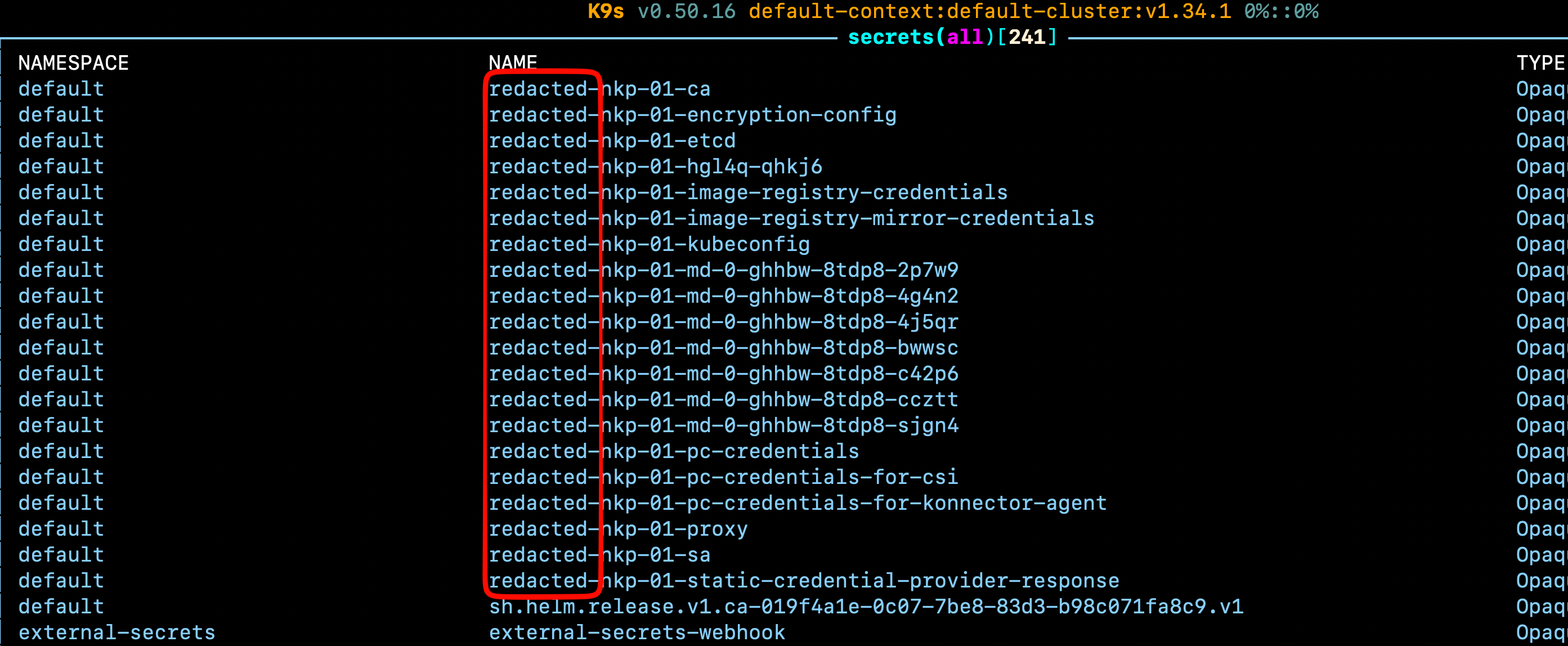
You can then export the KUBECONFIG it prints and browse the cluster state as if you were connected to the real cluster by using tools such as k9s.

Wrap up
Custom redactors are a simple but important step when sharing nkp diagnose bundles. By keeping pod and service IPs visible while masking node LAN IPs and sensitive hostnames, we get the best of both worlds: enough information for effective troubleshooting without exposing internal details. And when you need to dig into the bundle yourself, troubleshoot-live plus a quick unredaction step lets you browse the collected state safely.
That's all for today!